

Goal review
The goal review answers a simple question: where do each player’s problems come from? Your team declares what it counts and what it qualifies. You record during the match. Then you walk each goal — scored and conceded alike — to say what happened.
Nothing is imposed: the vocabulary is yours, and the analysis stays optional.
Defining your match vocabulary
Section titled “Defining your match vocabulary”Go to Team settings → Match vocabulary. Three families are set there.
| Family | What it is | Example |
|---|---|---|
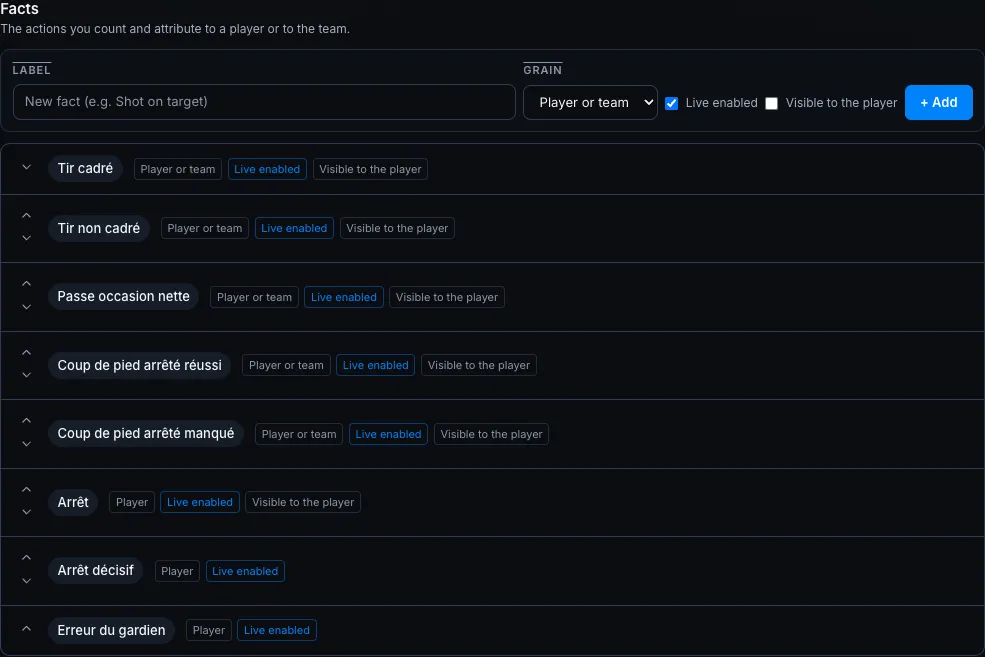
| Facts | the actions you count and attribute | Shot on target, Save, Key pass |
| Roles | the slots of a goal’s attribution chain | Scorer, Assist, Trigger, Bad positioning |
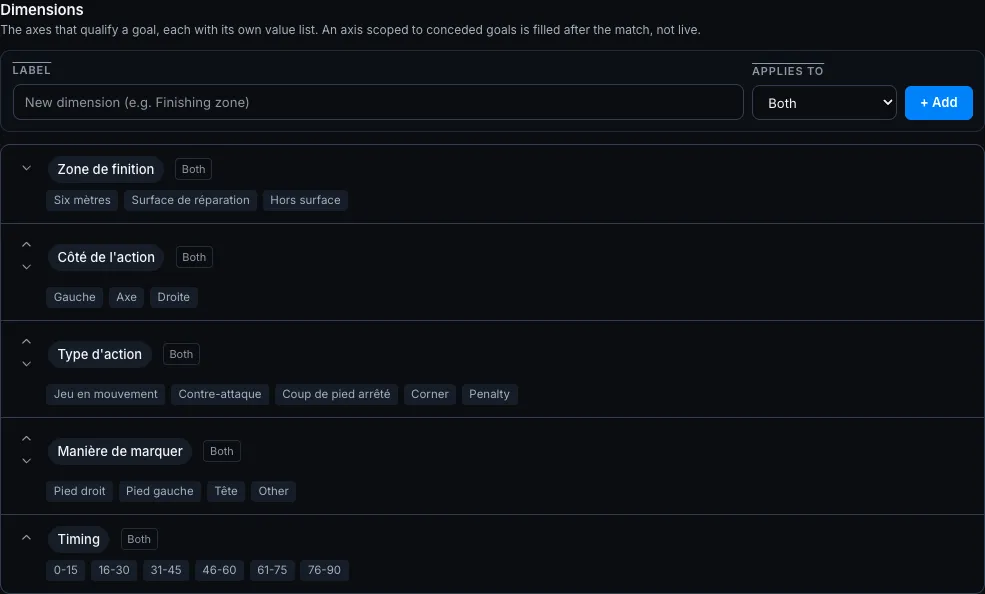
| Dimensions | the axes that qualify a goal, each with its values | Finishing zone, Action side, Scoring method |
The idea that simplifies everything: an individual error is a role, exactly like “assist”. You only declare which side each role applies to.
Starting from a template
Section titled “Starting from a template”Load the sport template adds the template items you are missing. Your existing items are kept and nothing is duplicated. You can reload it safely.
Six sports get a ready-made grid.
| Sport | Facts proposed |
|---|---|
| Football | Shot on target, Shot off target, Key pass, Set piece won, Set piece missed, Save, Decisive save, Keeper error |
| Futsal | Shot on target, Shot off target, Accumulated foul, Key pass, Save, Decisive save, Keeper error, Turnover in own half |
| Handball | Turnover, Seven-metre scored, Seven-metre missed, Missed shot, Interception, Block |
| Basketball | Turnover, Three-pointer made, Free throw made, Free throw missed |
| Volleyball | Winning attack, Attack error, Service error, Reception error, Dig, Perfect set |
| Rugby | Tackle made, Tackle missed, Turnover won, Penalty conceded, Knock-on, Offload, Lineout won |
Football also gets a full grid of roles: scorer, assist, trigger, then seven individual errors — bad positioning, not marking, lost ground duel, lost aerial duel, misread trajectory, needless foul, no communication.
Every other sport gets a short generic template: scorer, assist, and two axes (Zone, Timing). You complete it yourself.
Each item’s settings
Section titled “Each item’s settings”| Setting | On what | What it decides |
|---|---|---|
| Grain | a fact | whether it counts per player, for the collective, or both |
| Live enabled | a fact | whether it appears as a target in the match console |
| Visible to the player | a fact | whether it reaches the player portal |
| Applies to | a role, a dimension | goals scored, goals conceded, or both |
| Offer to the delegated scorer | a role | whether it travels to the delegated scorer link |
A fact loaded from a template arrives live enabled. You tick nothing to see it in the console.
Dimensions and their values
Section titled “Dimensions and their values”A dimension carries its own value list. You edit them all together: Edit, then you add, rename or clear a value, then you save. A value whose label you clear is removed.
Renaming, reordering, archiving
Section titled “Renaming, reordering, archiving”- Renaming breaks nothing: an item’s internal key never changes, so the whole history stays attached.
- Archiving removes the item from the pickers. What was already recorded keeps its label and stays counted.
- An archived item can be restored. Its key is never handed to a new item: recreating the same label offers you the restore instead of a duplicate.
After every change, the screen brings you back to the item you just edited.
Recording during the match
Section titled “Recording during the match”Your facts, roles and dimensions land straight in the console. The live match guide covers those three surfaces in detail.
Walking the goals after the match
Section titled “Walking the goals after the match”From a match’s session review, the Goal review card opens the screen. The app walks the goals one by one, in order, with their minute and scorer already known.
For each goal:
- Fill in the configured Qualifications — one value per dimension.
- Complete the Attributions: a role, a player. Add an attribution stacks as many as you need.
- Save moves to the next goal; the last one takes you to the recap.
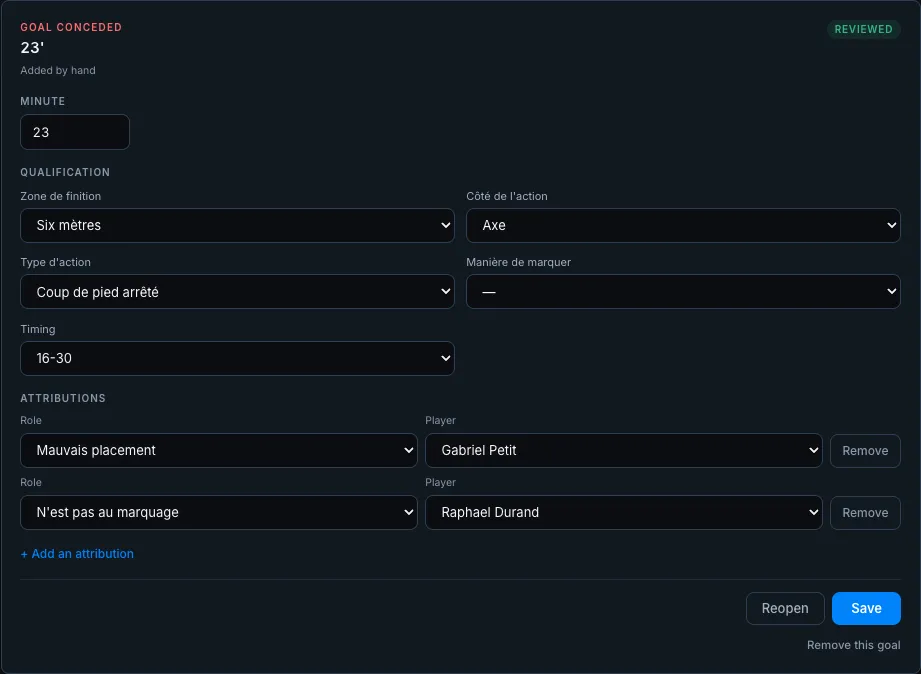
The chain you typed pitch-side is already there: you correct it, you do not retype it.
Placing the goal on the pitch and in the goal
Section titled “Placing the goal on the pitch and in the goal”Each goal card carries two diagrams:
- On the pitch: tap the spot the goal came from;
- In the goal: tap the goal where the ball went in. The goal reads seen by the shooter: their left is on the left.
What you placed live is already there: you correct it or you complete it. Clear removes a point. On the keyboard, the arrow keys move the pitch point and Delete clears it. The position is saved with the rest of the card.
Attaching the goal’s video
Section titled “Attaching the goal’s video”The Video panel keeps the goal’s sequence. Add the video offers two sources, one or the other:
- Sequence link: paste the Veo, YouTube, Vimeo, Hudl… link. It is kept exactly as you pasted it, so with its sequence.
- Video file: Choose a file on your phone or computer. MP4, MOV or WebM, 250 MB max. A bar tracks the upload.
Then Add. Each video plays according to its source:
| Source | What you see |
|---|---|
| Uploaded file | the video plays in the card |
| YouTube, Vimeo | the video plays in the card; a YouTube link that carries a time starts at that moment |
| Veo | the sequence’s preview and Watch the sequence on Veo, which opens it in Veo |
| Hudl | Watch the sequence on Hudl, which opens it in Hudl |
| Any other link | Open the video, in a new tab |
A Veo link opens in Veo: what Veo lets other pages play is the whole match, which would start at kick-off. The sequence and your Veo drawings stay in Veo.
A goal holds up to five videos, for several angles of the same action. Pasting the same link twice creates no duplicate. Remove takes a video off; an uploaded file is then deleted.
The three score states
Section titled “The three score states”The screen compares the recorded score to the goals listed, and says so plainly:
| State | What it means |
|---|---|
| Score recorded + consistent | the score matches the goals listed |
| Score recorded + divergent | the screen says so and picks neither — add or remove a goal |
| Score not recorded | no score exists yet: enter it in the review, or add the goals by hand |
A recorded 0-0 reads “nothing to analyse”. That is not the same thing as a missing score.
Analysing a match with no run
Section titled “Analysing a match with no run”Add a goal creates a goal by hand. It is useful when no match run was ever started. A match recorded after the fact analyses exactly like any other.
A goal from a run that no longer exists shows under Goal from a previous run: keep it or remove it.
Reading the recap
Section titled “Reading the recap”At the bottom of the review, the recap spreads the goals over each of your dimensions, scored on one side, conceded on the other. It enumerates your vocabulary: a dimension you created appears there with no further setup.
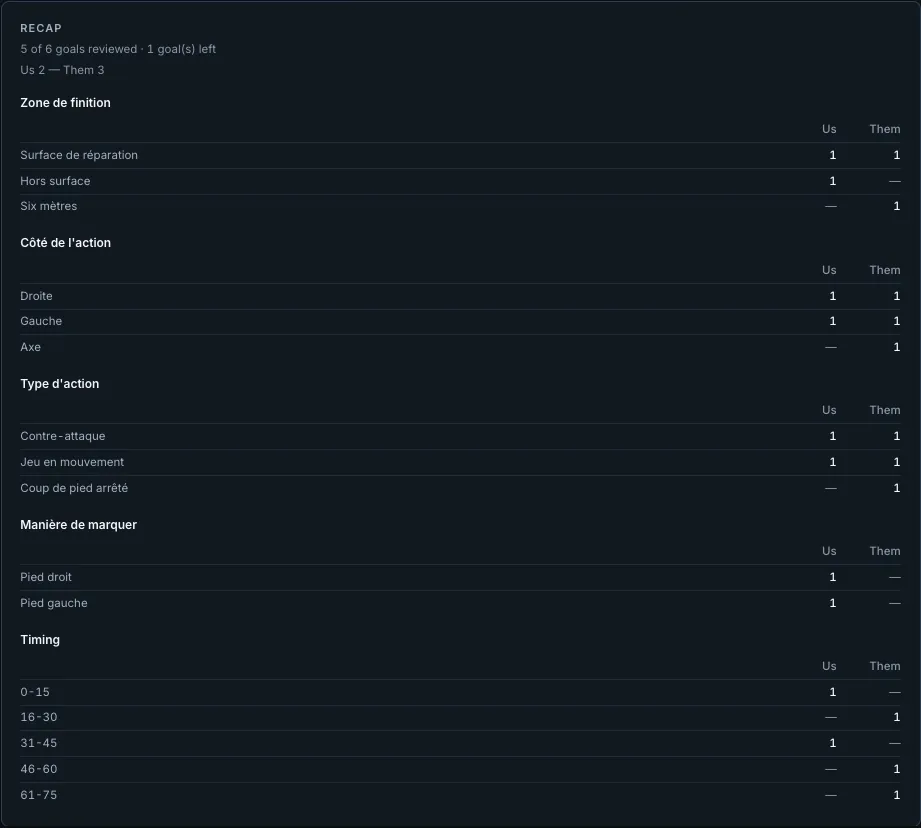
An empty cell reads ”—”, never a 0: nothing recorded is not the same thing as zero.
Below the recap, the map of reviewed goals switches between Pitch (where the goals come from) and Goal (where they go in).
The recap counts only the goals marked reviewed. The counter at the top tells you how many are left.
Cards do not go through the review: you read them as they are in the Cards tab, right next to the Goals tab on the Statistics page.
Reading goals in the goal
Section titled “Reading goals in the goal”In Statistics → Goals, the In the goal block shows where the reviewed goals go in, zone by zone, seen by the shooter: Goals scored on one side, Goals conceded on the other. The “placed out of” line tells you how many reviewed goals carry a position in the goal.
If your shots and saves are placed live, each zone also carries a small rate:
| Grid | Small figure |
|---|---|
| Scoring rate by zone (goals scored) | your goals ÷ your shots on target in the zone |
| Saves by zone (goals conceded) | your goalkeeper’s saves ÷ shots on target faced in the zone |
An empty zone reads ”—”. Open on the pitch leads to the Pitch tab, which crosses the goal with where the shots come from.
On a player’s profile, Their goals in the net shows the same points for their goals only.
Seeing a player’s recurring items
Section titled “Seeing a player’s recurring items”On a player’s profile, the Recurring match items card shows their roles and facts over the chosen period, most frequent first. Clicking an item leads to the goals concerned.
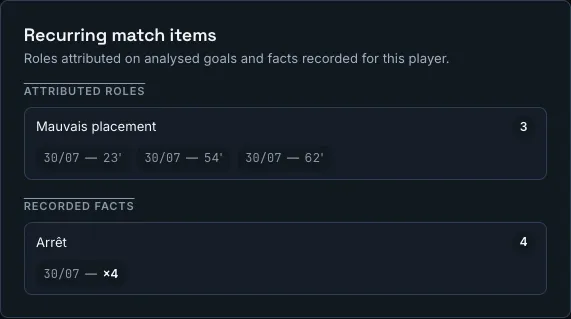
The card counts roles carried by goals explicitly marked reviewed. A chain saved on a goal you have not signed off is work in progress, not a finding.
Finding your facts in reports
Section titled “Finding your facts in reports”Every fact in your vocabulary becomes a report criterion. You pick it like any other metric, under its own label.
Two rules there follow your settings:
- The grain decides where the fact may be a column. A collective fact never becomes a player column.
- Visible to the player decides whether it appears on player surfaces. A hidden fact stays staff-only.
An archived fact keeps its label in the reports already built. It simply stops being offered as a new column.
Asking the assistant
Section titled “Asking the assistant”The AI assistant reads your analyses and can propose writing one for your approval: “qualify the second conceded goal as a counter-attack, left side”. It transcribes what you dictate — it never guesses an individual error on your behalf.