
Do your check-in
The check-in is a short questionnaire to fill in each morning. In under a minute, you log your daily state and help your staff adapt the session.
How it works
Section titled “How it works”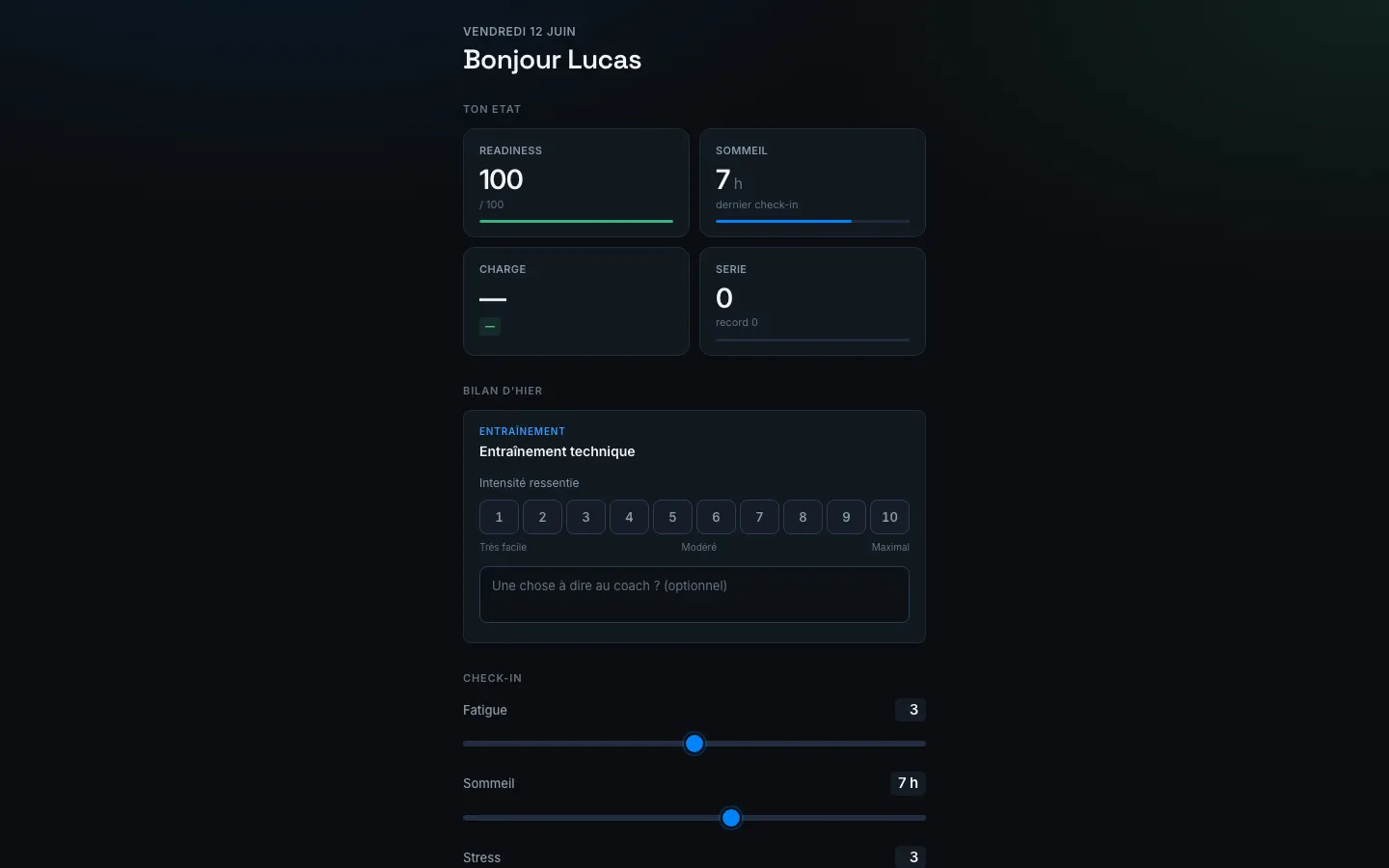
- In the morning, you receive a reminder (push or SMS).
- Open the link or the STRIVN Player app.
- In the CHECK-IN section, move the sliders:
- Fatigue — how do you feel physically?
- Sleep — how many hours did you sleep?
- Stress — your general stress level
- (and any other indicator enabled by your team)
- Submit. That’s it.
Personal dashboard — YOUR STATE
Section titled “Personal dashboard — YOUR STATE”At the top of the check-in, four tiles summarise your recent state:
| Tile | Description |
|---|---|
| READINESS | Your readiness for the day (0–100) — from your check-ins, and estimated from your load between check-ins |
| SLEEP | Hours of sleep declared at the last check-in |
| LOAD | Cumulative load from recent sessions |
| STREAK | Number of consecutive check-ins (your record is shown) |
Yesterday’s review — post-session feedback
Section titled “Yesterday’s review — post-session feedback”If you took part in a session the day before, a Yesterday’s review section appears:
- Select your perceived exertion (RPE 1–10): from Very easy to Maximum
- Add an optional comment for the coach
This feedback is cross-referenced with the coach’s review in the session results.
Getting a request right after the session
Section titled “Getting a request right after the session”If your coach enabled this option for the event, you get a direct request about an hour after the session ends — by push notification, WhatsApp or email, depending on what’s available for you. No need to wait for the next day’s check-in.
The message takes you to Past sessions, where you rate your perceived exertion (RPE 1–10) and add an optional comment — just like in Yesterday’s review. Once submitted, you won’t be asked about that session again.
You can also find sessions still waiting for your feedback at any time from your schedule, in the Past sessions to rate block.
Who sees my responses?
Section titled “Who sees my responses?”Your staff only, to adjust the session and prevent injuries. Other players cannot see your data.
Did not receive the reminder?
Section titled “Did not receive the reminder?”Check that notifications are enabled (see The STRIVN Player app). You can also open the check-in manually from the app at any time.