

Cards
The Cards tab answers three questions across several matches at once: how many cards your team takes, who takes them, and when in the match they fall. It passes no judgement — a card is a referee’s decision, not an opinion from the staff.
Where to find it, and who sees it
Section titled “Where to find it, and who sees it”Menu Statistics → Cards tab, between Players and Training.
Unlike the Goals and Players tabs, which name a player in an error attribution, the Cards tab is open to anyone with access to the Statistics page, including a delegate. The reason is simple: nobody in the club attributes a card, you only record it.
The tab does not exist for a sport that hands out no cards — basketball has none. And the types shown are your sport’s own: football shows Yellow card and Red card, handball adds 2 minutes.
Where the cards come from
Section titled “Where the cards come from”Two sources feed it, and there is nothing extra to enter:
- the live match, where every card tapped on the console carries its minute of play;
- the match sheet, filled in afterwards in the match’s session report, which carries totals per player only.
A card is never counted twice. The screen says so under the tiles: “A card is counted once and once only: the match sheet when it carries it, the live run otherwise.” The sheet already includes what you typed pitchside and your corrections, so it takes precedence wherever it carries the card, and the live run fills in the rest.
The tiles, and the line to read first
Section titled “The tiles, and the line to read first”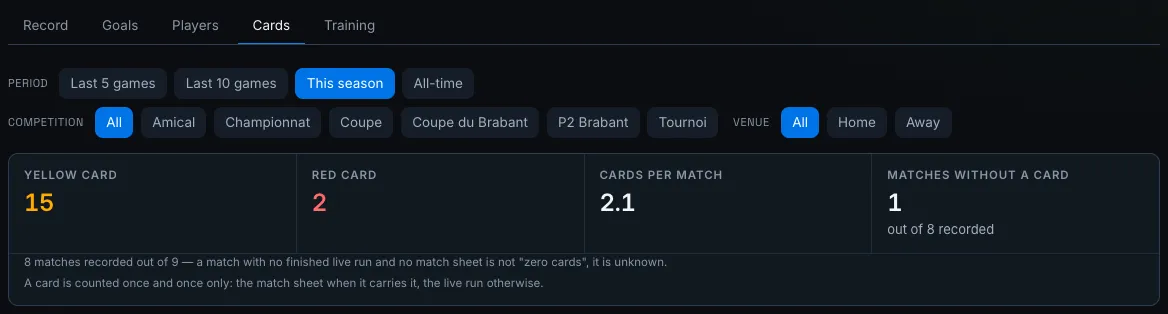
At the top, one tile per card type in your sport, then two reading tiles.
| Tile | What it counts |
|---|---|
| Yellow card, Red card, 2 minutes… | the type’s total over the filtered window |
| Cards per match | the total divided by the recorded matches only |
| Matches without a card | recorded matches where nobody was booked, “out of N recorded” |
Under the tiles, one line states what all of this was counted on: “8 matches recorded out of 9”. That is the first thing to look at before reading an average.
A match is recorded as soon as it carries a finished live run or a match sheet. A match with neither is not a match without cards: nobody knows. It shows ”—” and it drops out of the denominator of “cards per match”.
If a card was tapped live without naming a player, one more line says so: it counts in the team totals, never in the per-player table.
By player
Section titled “By player”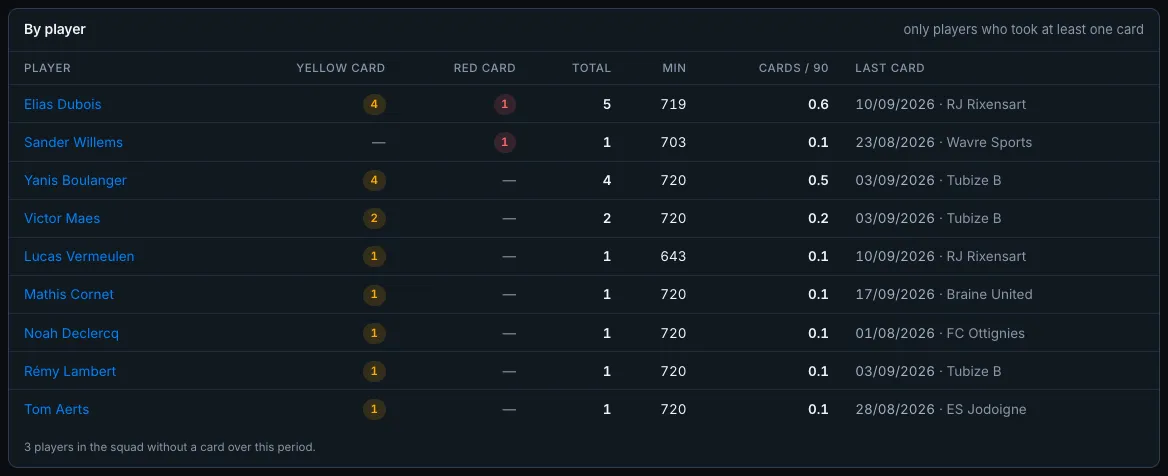
The By player table lists only the players who took at least one card; the card’s footer counts the squad members who got through. The order is deliberate: sendings-off first, then the total, then the name. The player who changed a match therefore rises to the top, even with fewer cards overall.
| Column | What it says |
|---|---|
| Player | the name, linking to their profile |
| one column per type | that type’s count, as a pill |
| Total | all types together |
| Min | minutes played in recorded matches |
| Cards / 90 | the total brought back to 90 minutes of play |
| Last card | the date and the opponent |
The Cards / 90 column stays silent — ”—” — until a player has 180 minutes in recorded matches. Hover the dash: it says why, either “Fewer than 180 minutes in recorded matches” or “No minutes played in a recorded match”. It is the Players tab’s floor, reused as is so that two screens never go quiet for different reasons.
A player who has since left the squad keeps their row: the card did happen.
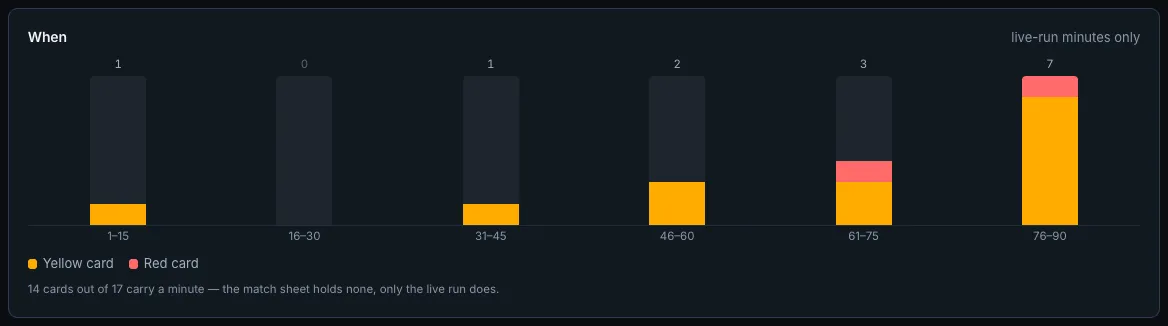
The When section slices the match up and stacks the cards by type. Football reads in quarter-hours — 1–15, 16–30, 31–45, then 46–60, 61–75, 76–90; shorter periods, handball or futsal, read in tens of minutes. A slice with no card keeps its column and its “0”: a gap in the axis would read as a slice that does not exist.
Two filing rules:
- stoppage time falls into the last slice of its period — a 47th minute is the end of a first half;
- extra time opens an Extra time slice, which only appears if it carries something.
A sport with no period length — volleyball, which is played in sets — has no When section at all.
By venue, by result
Section titled “By venue, by result”
Two tables side by side, with the same columns: Matches, Cards, / match.
- By venue — Home, Away, Not specified. The third row is not a glitch: a match nobody said was played at home is neither one nor the other, and it is counted apart rather than filed at random.
- By result — Wins, Draws, Losses, on matches with an oriented score only.
A row with no recorded match shows ”—” and not “0.0”: “we behave away from home” and “we recorded nothing away from home” are not the same sentence.
By match
Section titled “By match”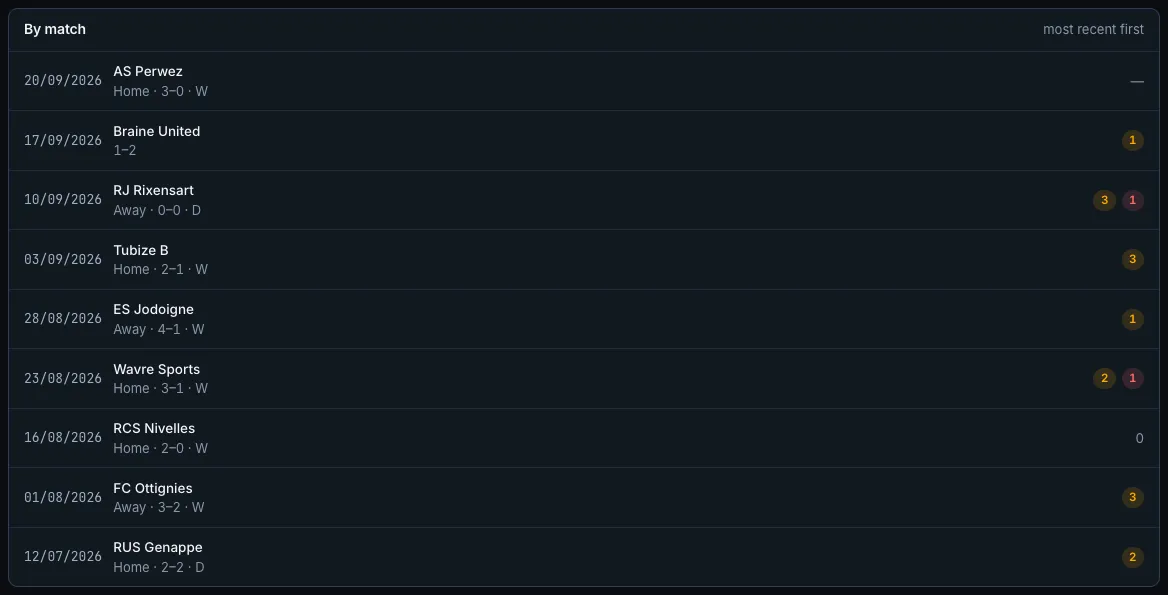
The list runs from the most recent to the oldest. Each row carries the date, the opponent, Home or Away, the score and the result, then the match’s card pills.
- 0 — the match is recorded, nobody was booked.
- — — the match is not recorded: no finished live run, no match sheet. The hover says so.
- A match whose venue was never specified shows its raw score, with no Home/Away and no result.
Clicking a row opens that match’s session report, where the match sheet sits — that is where a total gets fixed.
Filtering the read
Section titled “Filtering the read”The filter row is the one used by the other match tabs, and it follows the tab: changing the period does not take you out of Cards.
| Filter | Values |
|---|---|
| Period | Last 5 games, Last 10 games, This season, All-time |
| Competition | All, then each of your team’s competitions |
| Venue | All, Home, Away |
The filters travel in the address: a read can be bookmarked and reopened exactly as it was. The Competition filter only appears if your team has any on file.
Depending on your club’s plan, the widest periods may not be offered. A banner above the filters then tells you which one is being served, and what opens the others.
What strivn does not work out
Section titled “What strivn does not work out”Two more limits, to avoid a false reading:
- The opponent’s cards are not counted. Entering them during a match is optional: a “they take more than we do” would rest on a sample nobody kept.
- “Not recorded” is not “zero cards”. That is the sentence that gets lost fastest the moment you look at an average.
Asking the assistant
Section titled “Asking the assistant”The AI assistant reads this tab and answers in the conversation:
- “Who took the most cards this season?”
- “When in the match do we take our cards?”
- “How many yellows in the league?”
- “How many matches without a card over the last ten?”
It always tells you how many recorded matches it counted on. And it will never tell you a player is suspended: that notion does not exist anywhere in strivn.