
Strength & 1RM
The Strength module lets your S&C coach assess each player’s maximal strength (1RM), compose structured workouts in percentage of 1RM, assign them to the calendar — then let each player run them with their own weight, computed automatically.
The key idea: you prescribe a percentage that is the same for the whole squad (e.g. “Squat 4×5 @ 80%”), but strivn shows a different actual weight for each player based on their personal 1RM.
The module is enabled per team (a rollout setting). Actions require staff with the Manage programs permission.
Set your preferences
Section titled “Set your preferences”Open Workout settings first — these drive every weight calculation:
| Setting | Purpose |
|---|---|
| Unit | Kilograms (kg) or pounds (lb) |
| Barbell / machine rounding | Rounds the total weight to the nearest step (e.g. 2.5) |
| Dumbbell rounding | Rounds the per-hand load (e.g. 1.0) |
| 1RM estimation formula | Epley or Brzycki — used when a 1RM is estimated from a set |
| Rep cap | Beyond this, an estimate is flagged as unreliable |
| Automatic 1RM update | Propose to coach (recommended), Update automatically, or Do nothing |
Assess 1RMs
Section titled “Assess 1RMs”Go to 1RM assessments.
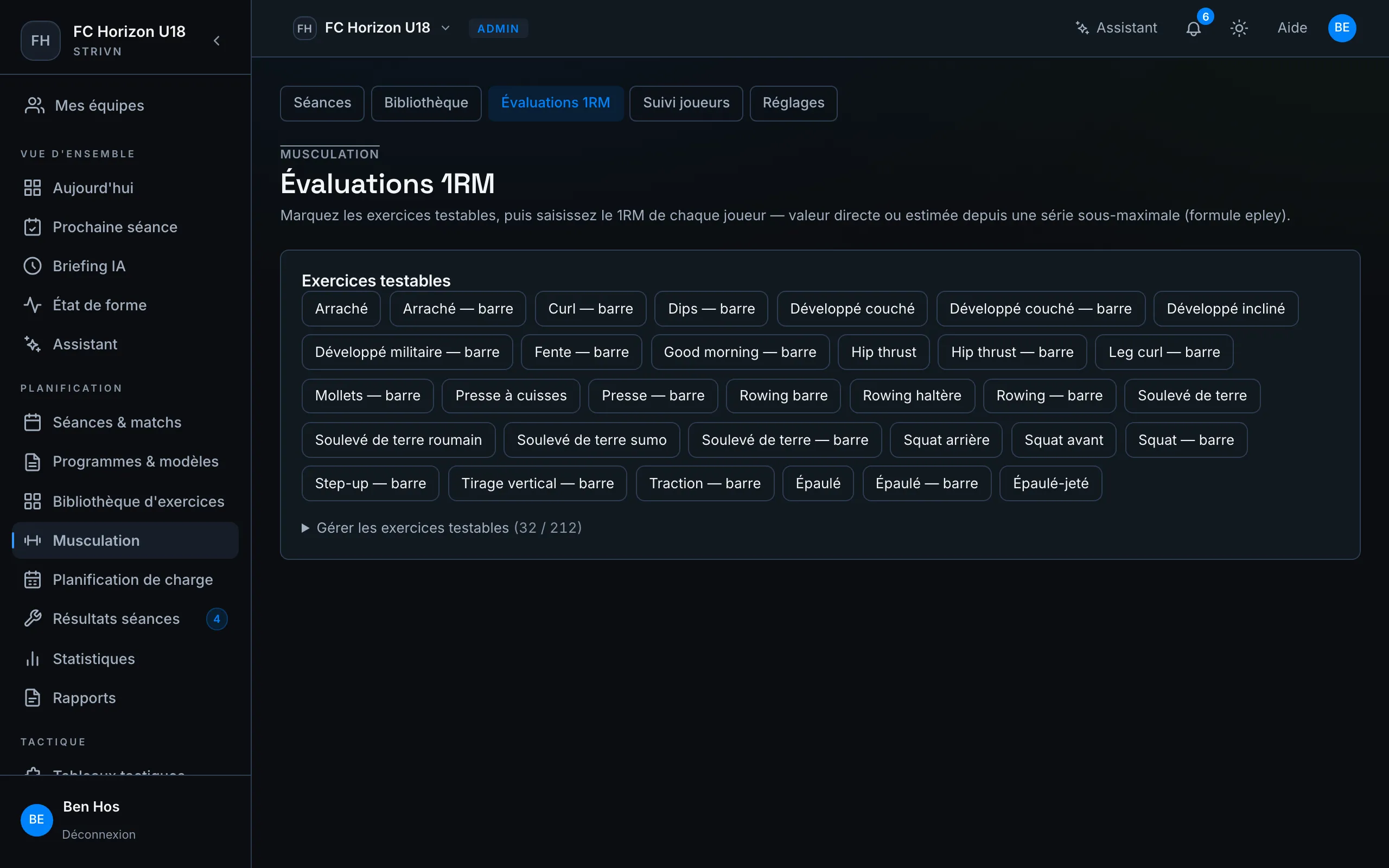
- Flag the testable exercises. Pick the library exercises where a 1RM makes sense (Back Squat, Bench Press…).
- Select an exercise to open its entry grid, one row per player.
- Enter each player’s max, either:
- Direct — you type the 1RM in kg.
- Estimated — you enter a submaximal set (reps × weight); strivn back-calculates the 1RM live with the chosen formula.
- Save. A player’s “current” 1RM is always the most recent value.
Build a workout
Section titled “Build a workout”Open Workouts → New workout for the builder.
- Give it a Title and a Focus (e.g. “Lower body”).
- Add blocks. Each block is a Straight set, a Superset (alternated exercises) or a Circuit (rounds).
- In each block, add exercises. For each, choose the load basis:
- % 1RM — the actual weight is computed from the player’s 1RM (flagship mode);
- kg — a fixed weight you type;
- RPE — a perceived intensity;
- BW — bodyweight.
- Fill in the sets (reps, intensity, tempo, rest). The + 3 identical sets button quickly duplicates a set (handy for wave loading).
- Use the per-player preview to see everyone’s real weight, set by set. Players with no 1RM show “to test”.
- Save as a draft, then tick Published when the workout is ready to assign.
Supersets and circuits
Section titled “Supersets and circuits”In a Superset or Circuit block, the exercises form one alternated group. The builder shows it: A1 / A2 labels, a blue rail linking the exercises, and a line stating how the block runs.
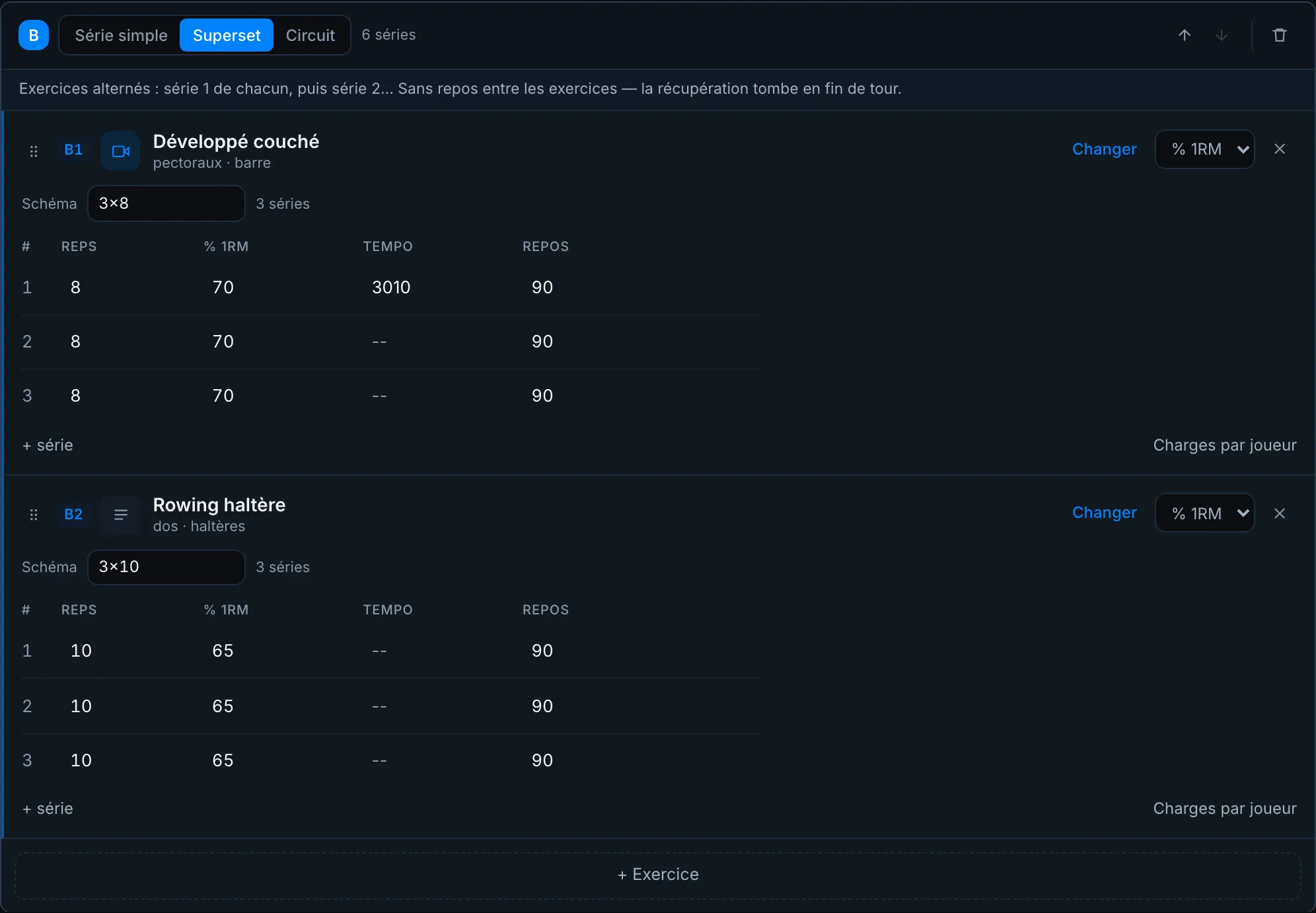
The player runs the block round by round: set 1 of each exercise, then set 2, and so on. Within a round they chain the exercises without rest — the rest you set on the sets lands at the end of the round.
The exercise sheet follows the player
Section titled “The exercise sheet follows the player”Whatever you put on a library exercise — written cues, a photo, a video — appears in the player’s runner under How to do it. A muscle group per exercise also feeds the workout’s muscle split (the chips at the top of the builder).
Assign a workout and adjust per player
Section titled “Assign a workout and adjust per player”From a workout calendar event, open its plan:
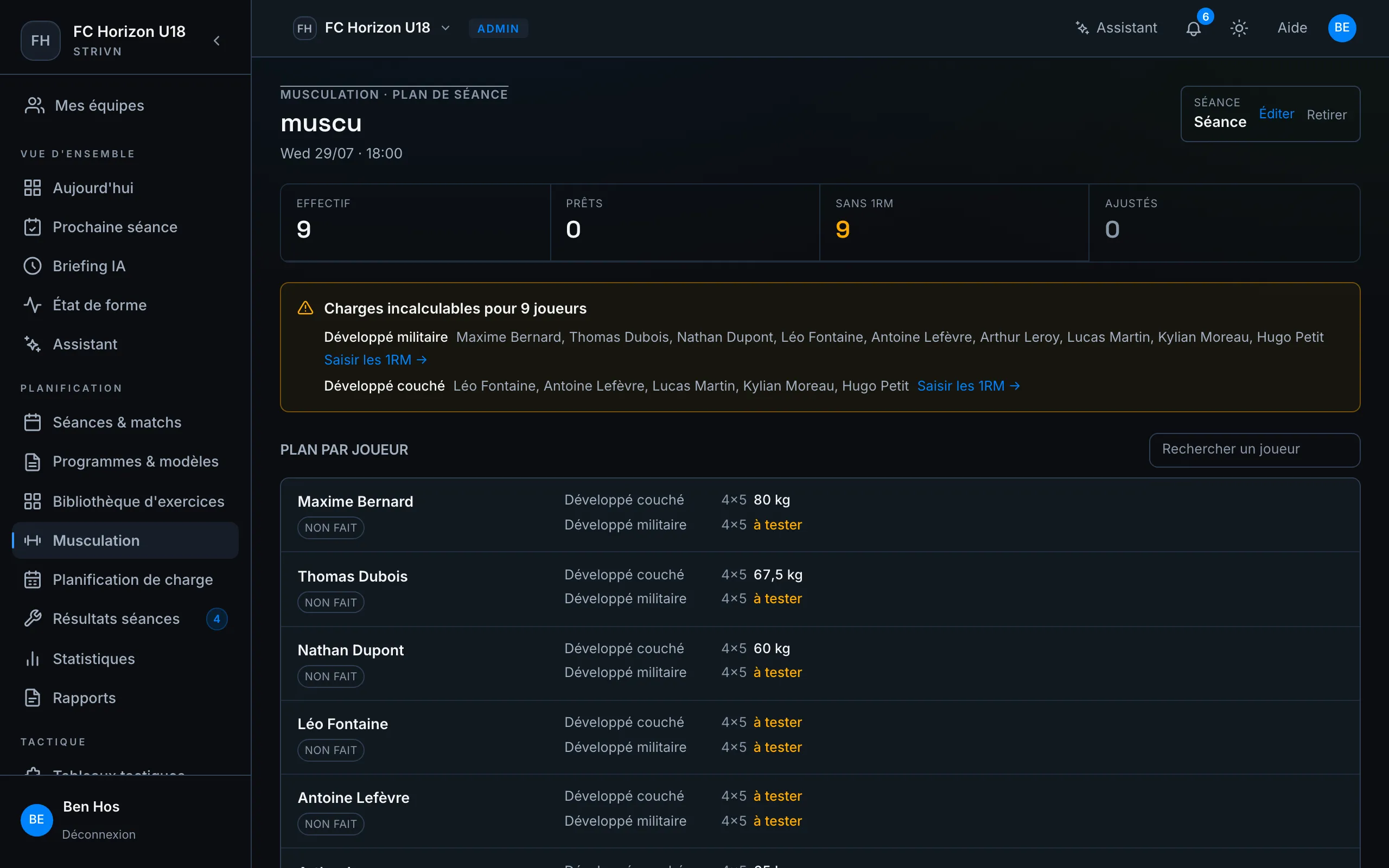
- Assign a published workout. Each convoked player receives it in their own weights. You can also start from the workout itself (Assign to an event) or from the load planner, which lists the week’s workout events.
- Adjust a player if needed:
- Scale — reduce/increase their load by a percentage (e.g. 60% for a return to play);
- Exclude — remove them from the session;
- Swap an exercise or pin an absolute weight (via the AI assistant).
- The per-player plan shows everyone’s resolved weight, adjustments included.
Track completion
Section titled “Track completion”On the workout plan:
- a completion badge per player (e.g.
3/4 sets) shows who did the work; - the Proposed new records section lists 1RMs to update when a player lifted heavier than their stored max. Confirm to update their 1RM, or Dismiss the proposal.
Each strength session’s load flows automatically into the Training load page (charts and ACWR).
Drive it with the AI assistant
Section titled “Drive it with the AI assistant”The AI assistant can do it all in plain language: “record Jean’s squat 1RM: 5 reps at 100 kg”, “generate a 3-block leg strength workout”, “assign Wednesday’s session”, “scale Jean to 60% for his return”. Every action is proposed and then confirmed by you before it runs.
For players
Section titled “For players”See the player guide: My strength session.